
Most manufacturers don’t think about ERP support until something goes wrong. Unfortunately, that’s often when the consequences are most expensive. A failed integration, inaccurate inventory, delayed shipment, or reporting issues can quickly ripple across production, customer service, finance, and the supply chain.
The good news is that these problems are often preventable. Mid-year provides a natural opportunity to evaluate how well your ERP is supporting your business before the busy production months and year-end planning begin. With six months of operational data available and time to implement improvements, manufacturers can identify risks, improve performance, and uncover opportunities for automation before small issues become costly disruptions.
Why Mid-Year Matters for Manufacturers
Mid-year isn’t simply a slower period for many manufacturers; it’s also a strategic planning window. Leadership teams begin evaluating budgets, technology investments, staffing needs, and operational priorities for the coming year. Reviewing your ERP environment now gives you time to address issues before peak production, budget planning, and software upgrade cycles compete for attention.
Signs Your ERP Needs Attention
As mentioned, you don’t want to wait until something breaks to optimize your ERP. If you do, then it will break at a time when your systems are stress-tested, such as the Q4 peak before the holidays.
Assessing your ERP’s needs ahead of time allows you to take care of issues when you aren’t busy with other things and actually make the most of any mid-year dip you might be experiencing.
Here are some signs that you might need to pay more attention to your ERP:
Users Are Creating Manual Workarounds
When your ERP doesn’t do what an employee wants, they might complain to IT. More likely, though, they will just work around it. This might mean manually transferring data, adjusting their workflow, or ignoring what it is saying.
Unfortunately, manual workarounds tend to increase errors, especially if employees are retyping data rather than transferring it (any time data are retyped, there is the chance of a typo). Employees might not immediately admit to workarounds; ask them what they are doing in non-confrontational ways and always periodically ask if people are happy with the ERP and its functioning.
Reports Don’t Match Expectations
Sometimes, it can be hard to spot a subtle error. Other times, you might have a significant mismatch between what you projected and your actual report. This should always be investigated. This means the predictions are wrong. Often something is going on, such as supply chain issues.
And your report is what’s wrong. If a report is way off from what you expected, then it may be time to review your ERP and establish what is going on. Is the data accurate? Are people generating reports through unapproved means to avoid a bottleneck?
Minor errors, again, may be hard to spot. But sometimes you can drive a forklift through the gap between your expectations and your reports.
Customizations Have Become More Difficult to Maintain
Few manufacturers can use an ERP “off the shelf.” Customizations, whether minor or extensive, are a key part of ERP optimization. They are also often the first thing to fail. If your IT team is constantly patching customizations or going back to the provider, it may be a sign that your customizations need to be re-optimized. For example, a version update often breaks customizations, and it might do so in subtle ways…instead of just stopping working, your customization becomes less reliable.
If your IT team is spending more time on maintaining customizations, it might be faster and easier to redo some or all of them so that they are more stable and your ERP maintenance is easier.
Support Tickets Are Increasing
This one’s a lot easier to spot. If you are seeing more and more ERP-related support tickets, something is probably not working right. You might also see an uptick in tickets after an upgrade, indicating that employees are having an issue with a change in the UX and need a little bit of extra training.
Alternatively, they could mean an increase in bugs that warrants re-optimization, or even a change in service provider. Always monitor support tickets, and always listen to IT if they say they are seeing a pattern.
Integrations Frequently Fail
Like customizations, integrations are key to your business’ success, and also often a weak point in the system. Integrations failing can indicate a version compatibility problem, when one piece of software has been upgraded and the other not. A skilled provider can work around these, but frequent failures of integration might indicate a major retuning needs to be done, especially if multiple integrations are failing.
When integrations fail, people start to resort to manual workarounds.
Employees Avoid Using Certain ERP Features
If usage tracking or talking to employees indicate that people are avoiding specific features, then you need to optimize. If nobody is running a certain kind of report, but rather generating it manually because, for example, it is taking too long to run, then that code should be looked at.
Don’t place too much weight on one or two employees who may just dislike the interface or need training, but if the majority of employees are avoiding a feature, it’s probably not working well.
ERP consulting can help address these problems and optimize your ERP for the future and ERP best practices.
ERP and EDI: A Small Change Can Have a Big Impact
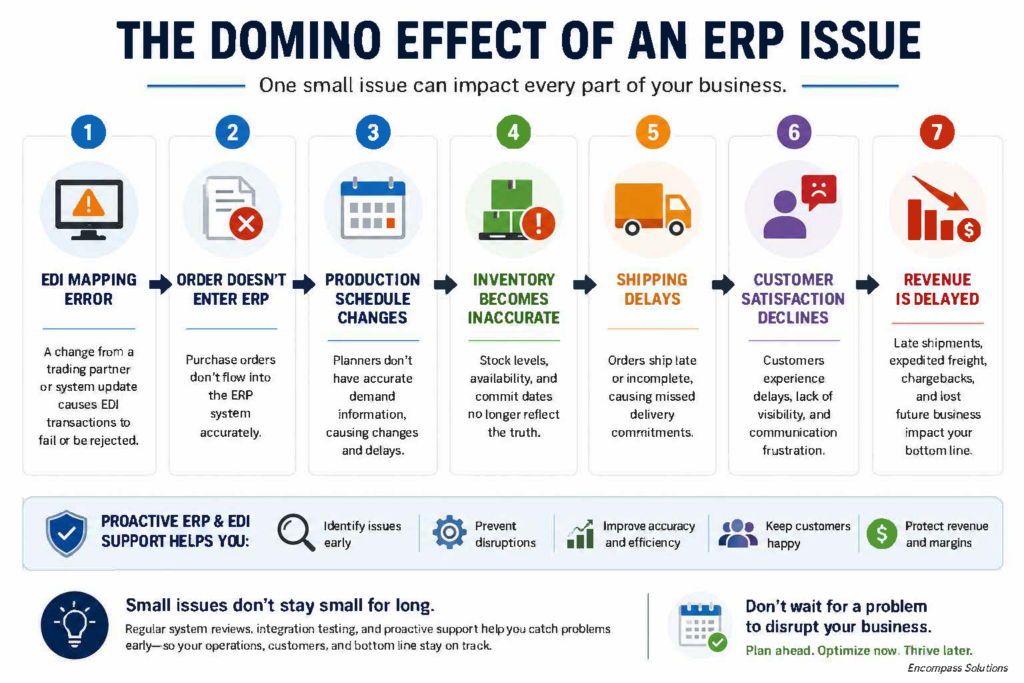
Imagine a manufacturer receives hundreds of customer orders through EDI every morning. One of its largest customers updates its EDI requirements, causing purchase orders to fail validation. Because the ERP relies on those transactions to drive production planning, the issue isn’t immediately recognized.
Customer service begins entering orders manually. Production schedules become inaccurate. Inventory levels no longer reflect actual demand. Shipping priorities change throughout the day, and accounting must reconcile invoice discrepancies after the fact.
What started as a simple EDI mapping issue has now affected nearly every department, from customer service and operations to shipping and finance.
This is why ERP and EDI shouldn’t be viewed as separate technologies. They are part of the same operational workflow. Proactive monitoring, regular health checks, and ongoing support help identify issues before they disrupt production, reduce manual workarounds, and keep your supply chain running smoothly.
Don’t Overlook Your EDI Environment
Another thing far too many manufacturers do is overlook their electronic data interchange (EDI) environment. They see it as separate from their ERP when, in fact, the two systems are strongly interconnected.
Problems with your EDI directly impact orders, shipments, invoices, customer compliance, and supplier communication. In other words, they can break the entire chain of how things get from raw materials to your end user.
Some common issues with EDI include:
- Manual intervention. As with your ERP, any time data are retyped, errors are likely. EDI automation is vital.
- Mapping errors. When data are not properly mapped, often caused by formatting errors or misaligned fields, orders can fail, and shipments can be delayed.
- Trading partner onboarding delays. If the EDI doesn’t map smoothly, then both vendors and customers can take longer to onboard.
- ASN (advanced shipping notice) failures. When the ASN doesn’t go through, customers…or you…may not be ready to receive the shipment.
- Compliance penalties. EDI mistakes can cause compliance errors and result in fines, legal action, or unhappy customers who go elsewhere.
EnTrust EDI helps resolve all of these problems by providing an advanced EDI environment with extended support, systematic mapping, and consistent reliability. It integrates well with external entities and helps ensure communication through the entire supply chain.
If you’re seeing EDI issues, then it’s time for an EDI assessment to help determine whether you need to upgrade your EDI environment or change EDI support providers.
When ERP and EDI work together effectively, manufacturers benefit from faster order processing, fewer manual touchpoints, improved customer compliance, better supply chain visibility, and reduced administrative costs. Optimizing one without evaluating the other often leaves hidden inefficiencies in place.
What Does an ERP Health Check Include?
Your ERP should enable efficiency, visibility, and growth. An ERP Health Check helps manufacturing leaders understand where their system is working well, where it might be falling short, and what to prioritize next.
A traditional ERP Health Check includes the following:
- Operational efficiency and automation
- Financial visibility and accuracy
- Process alignment and system usage
- Strategic business
Stop guessing about your ERP’s performance, start with clarity, and a clear path forward.
How to Choose the Right ERP Support Partner
Mid-year is a great time to evaluate your ERP support services partner and ask key questions to determine whether they are still a good fit. Do they:
- Respond to requests on time
- Understand manufacturing in general and your industry in particular
- Provide strategic guidance
- Work with you to optimize processes
- Proactively recommend new functionality and features that might help your business
- Understand Epicor
- Help with reporting so you are getting the data you need in a format you understand
- Assist with automation
Many partners only provide reactive support. They fix bugs. They add new features if you ask for them. They listen to complaints. A knowledgeable partner, though, goes further than that and helps optimize your system by making proactive suggestions for improvement and offering guidance to help you get the best out of your ERP to match your specific needs.
Areas Worth Reviewing Mid-Year
So, what should you look at? In some cases, the answer might lie in some of the signs your ERP system optimization needs work. But ideally, you should go through a checklist. Here’s our suggested list of things to look at:
- Overall ERP performance and reliability
- User permissions – do everyone have the permissions they need and not the ones they don’t?
- Dashboards – are they serving their purpose and are people using them?
- Reporting – are reports matching expectations? Are they clear? Are they useful?
- Business Activity Queries (BAQs) – are they creating useful insights? Are there any you aren’t using? Any you wish you had?
- Business Process Management (BPM) – is your BPM working properly with your ERP? Is it providing smooth workflows? Are people avoiding it?
- Integrations – are all of your integrations up to date? Are some or all of them showing increased failure?
- EDI mappings – is your EDI mapping data correct? Are you getting expected responses?
- Automation opportunities – what are your employees still doing manually? Where can you save time with additional automation?
- Mobile users – are employees able to use the system on mobile devices? Are people waiting to get to the office because the mobile interface is substandard?
- Security – run tests and make sure your cybersecurity is solid.
- Training needs – are employees getting the training they need? Summer is a great time for a refresher!
- Upgrade readiness – is the system set up for future upgrades and improvements?
- Cloud readiness – are you using the cloud effectively?
- Business processes – does your ERP align with your business processes? Pay attention to places where they might have changed.
How Advanced ERP Creates Long-Term Value
Improving your ERP is a solid investment that creates long-term value. If you’re settling for ERP that just does what you want, you might be missing out. Proactive reviews of your ERP managed services help you future-proof them and may help you detect areas where you didn’t realize you wanted help.
The best ERP support providers do more than resolve support tickets. They become long-term advisors who help manufacturers continuously improve operations. Rather than simply responding to problems, they identify opportunities to streamline workflows, automate manual tasks, improve reporting, and prepare for future growth. Over time, this proactive approach helps organizations maximize the return on their ERP investment while reducing operational risk.
Why ERP and EDI Should Be Reviewed Together
Bringing this together, you should not just review your ERP and your EDI, but review them together.
Take a look at this workflow to understand why we look at both as one ecosystem:
- Order is entered through EDI
- ERP processes order
- Warehouse fulfills
- Shipment sent
- ASN transmitted by EDI
- Invoice generated by ERP
- Payment received
Every step of this depends on these systems being interconnected and working together. If you only optimize your ERP, you leave inefficiencies elsewhere, and the entire supply chain automation process stays bogged down.
Your ERP system is one of the most important investments your organization has made. Like a critical business asset, it requires ongoing attention, not just when something breaks.
A proactive mid-year review helps manufacturers reduce downtime, improve user adoption, strengthen ERP and EDI performance, and prepare confidently for the second half of the year.
The organizations that get the most value from their ERP aren’t necessarily the ones with the newest software. They’re the ones that continuously optimize it.
Key Takeaways
- Mid-year is an ideal time to review ERP performance before peak production.
- Manual workarounds often indicate opportunities for system optimization.
- ERP and EDI should be evaluated together, not independently.
- Proactive support reduces downtime and unexpected costs.
- An annual ERP Health Check helps maximize the value of your ERP investment.
FAQs
- What is an ERP health check?
- An ERP health check is a periodic review to make sure your ERP is performing as it should.
- How often should manufacturers review ERP performance?
- Ideally, ERP performance should be monitored on an ongoing basis, but a full review once a year is desirable.
- When should you evaluate ERP support?
- About once a year or if you are seeing problems, such as reporting issues or employees avoiding part of the system.
- Why does ERP performance decline over time?
- ERP performance may decline over time because of changing business needs, alterations to integrated software, or hardware changes.
- How do EDI issues affect ERP performance?
- Many workflows pass back and forth between the ERP and the EDI, so EDI issues may look like ERP issues. EDI issues can also compromise the data your ERP is using to generate reports.
- What are signs you’ve outgrown your ERP support provider?
- If your ERP provider is not making regular suggestions to improve your ERP and related workflows or if they seem to be struggling to scale with you, you may have outgrown them.
- What should be included in an ERP support review?
- An ERP support review should include upgrade readiness, overall performance, security, integration assessments, and training needs, among other things. A review should be comprehensive and aligned with your business goals.
- How can ERP support reduce downtime?
- Good ERP maintenance and proactive support help you spot problems before things break, and thus reduce downtime.
Encompass Solutions can help. We offer ERP system assessments and Epicor consulting. Our team can perform a comprehensive ERP and EDI Health Check. We will assess your security, identify risks, and uncover opportunities to optimize systems for improved performance. Let us help you get more value from your Epicor investment and schedule your complimentary ERP health check today. Or contact us to discuss your options.